MCP Zero Trust Auth (JWT Signer)
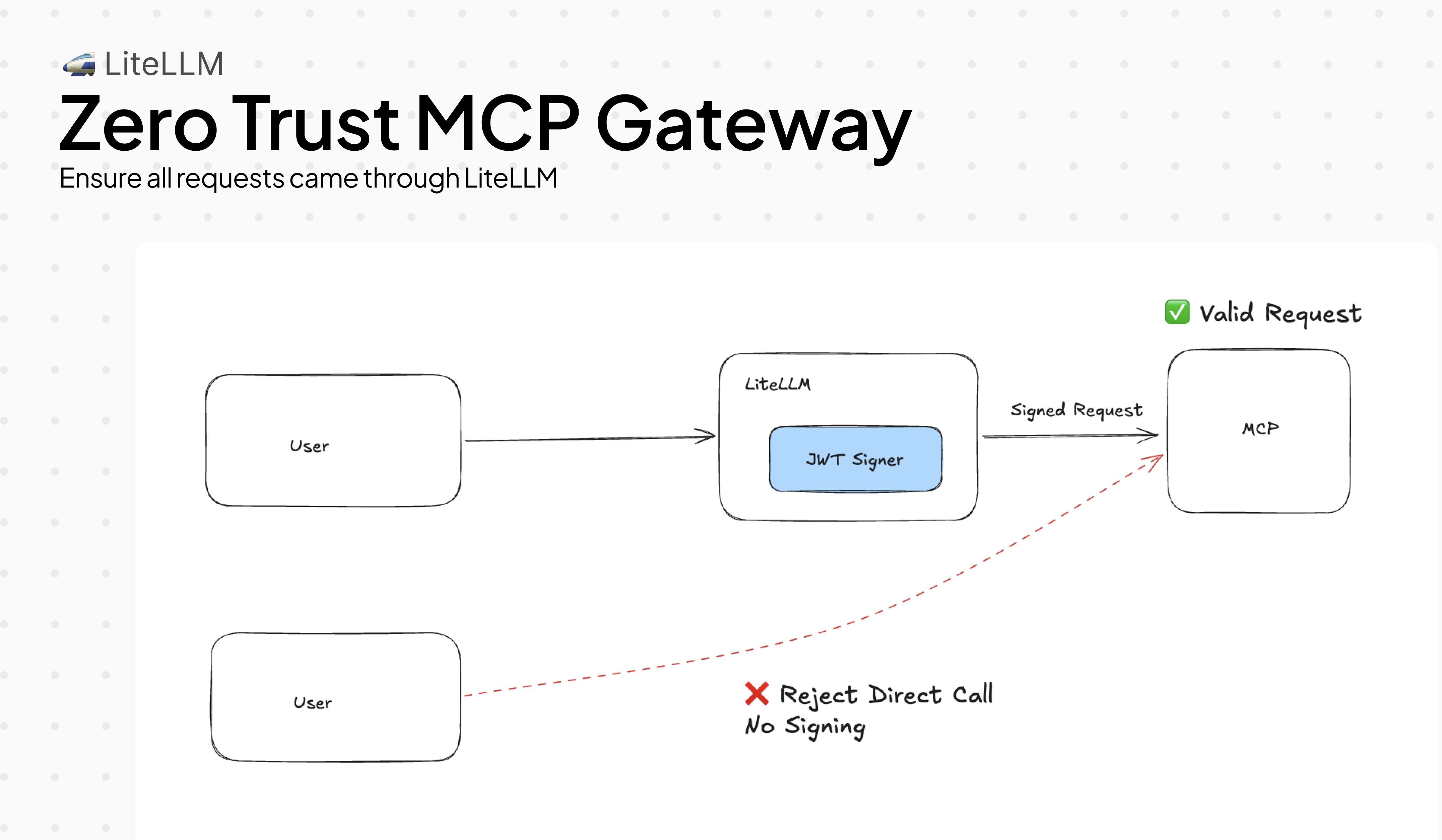
MCP servers have no built-in way to verify that a request actually came through LiteLLM. Without this guardrail, any client that can reach your MCP server directly can call tools, bypassing your access controls entirely.
MCPJWTSigner fixes this. It signs every outbound tool call with a short-lived RS256 JWT. Your MCP server verifies the signature against LiteLLM's public key. Requests that didn't go through LiteLLM have no valid signature and are rejected.
Basic setup
Add the guardrail to your config and point your MCP server at LiteLLM's JWKS endpoint. Every tool call gets a signed JWT automatically, with no changes needed on the client side.
mcp_servers:
  - server_name: weather
    url: http://localhost:8000/mcp
    transport: http

guardrails:
  - guardrail_name: mcp-jwt-signer
    litellm_params:
      guardrail: mcp_jwt_signer
      mode: pre_mcp_call
      default_on: true
      issuer: "https://my-litellm.example.com"  # defaults to request base URL
      audience: "mcp"                            # default: "mcp"
      ttl_seconds: 300                           # default: 300
Bring your own signing key. This is recommended for production, since auto-generated keys are lost on restart.
export MCP_JWT_SIGNING_KEY="-----BEGIN RSA PRIVATE KEY-----\n..."
# or point to a file
export MCP_JWT_SIGNING_KEY="file:///secrets/mcp-signing-key.pem"
Build a verified MCP server with FastMCP:
from fastmcp import FastMCP, Context
from fastmcp.server.auth.providers.jwt import JWTVerifier

auth = JWTVerifier(
    jwks_uri="https://my-litellm.example.com/.well-known/jwks.json",
    issuer="https://my-litellm.example.com",
    audience="mcp",
    algorithm="RS256",
)

mcp = FastMCP("weather-server", auth=auth)

@mcp.tool()
async def get_weather(city: str, ctx: Context) -> str:
    caller = ctx.client_id  # JWT `sub` — the verified user identity
    return f"Weather in {city}: sunny, 72°F (requested by {caller})"

if __name__ == "__main__":
    mcp.run(transport="http", host="0.0.0.0", port=8000)
FastMCP fetches the JWKS automatically and re-fetches when the signing key changes.
LiteLLM publishes OIDC discovery so MCP servers find the key without any manual configuration:
GET /.well-known/openid-configuration  →  { "jwks_uri": "https://<litellm>/.well-known/jwks.json" }
GET /.well-known/jwks.json             →  { "keys": [{ "kty": "RSA", "alg": "RS256", ... }] }
Read further only if you need to: thread a corporate IdP identity into the JWT, enforce specific claims on callers, add custom metadata, use AWS Bedrock AgentCore Gateway, or debug JWT rejections.
Thread IdP identity into MCP JWTs
By default the outbound JWT sub is LiteLLM's internal user_id. If your users authenticate with Okta, Azure AD, or another IdP, the MCP server sees a LiteLLM-internal ID rather than the user's email or employee ID.
With verify+re-sign, LiteLLM validates the incoming IdP token first, then builds the outbound JWT using the real identity claims from that token. The MCP server gets the user's actual identity without ever having to trust the original IdP directly.
guardrails:
  - guardrail_name: mcp-jwt-signer
    litellm_params:
      guardrail: mcp_jwt_signer
      mode: pre_mcp_call
      default_on: true
      issuer: "https://my-litellm.example.com"

      # Validate the incoming Bearer token against the IdP
      access_token_discovery_uri: "https://login.microsoftonline.com/{tenant}/v2.0/.well-known/openid-configuration"
      verify_issuer: "https://login.microsoftonline.com/{tenant}/v2.0"
      verify_audience: "api://my-app"

      # Which claim to use for `sub` in the outbound JWT — first non-empty value wins
      end_user_claim_sources:
        - "token:sub"       # from the verified incoming JWT
        - "token:email"     # fallback to email
        - "litellm:user_id" # last resort: LiteLLM's internal user_id
If the incoming token is opaque rather than a JWT (some IdPs issue these), add an introspection endpoint. LiteLLM will POST the token to it (RFC 7662) and use the returned claims:
token_introspection_endpoint: "https://idp.example.com/oauth2/introspect"
Supported end_user_claim_sources values:
| Source | Resolves to |
|---|---|
token:<claim> | Any claim from the verified incoming JWT (e.g. token:sub, token:email, token:oid) |
litellm:user_id | LiteLLM's internal user ID |
litellm:email | User email from LiteLLM auth context |
litellm:end_user_id | End-user ID if set separately |
litellm:team_id | Team ID from LiteLLM auth context |
Block callers missing required attributes
Some MCP servers expose sensitive operations that should only be reachable by verified employees, not service accounts and not external API keys. You can enforce this at the LiteLLM layer so the MCP server never receives the request at all.
required_claims rejects with 403 if the incoming token is missing any listed claim. optional_claims forwards claims that are useful but not mandatory.
guardrails:
  - guardrail_name: mcp-jwt-signer
    litellm_params:
      guardrail: mcp_jwt_signer
      mode: pre_mcp_call
      default_on: true

      access_token_discovery_uri: "https://idp.example.com/.well-known/openid-configuration"

      # Service accounts without `employee_id` are blocked before the tool runs
      required_claims:
        - "sub"
        - "employee_id"

      # Forward these into the outbound JWT when present — skipped silently if absent
      optional_claims:
        - "groups"
        - "department"
What the client sees when blocked:
HTTP 403
{ "error": "MCPJWTSigner: incoming token is missing required claims: ['employee_id']. Configure the IdP to include these claims." }
Add custom metadata to every JWT
Your MCP server may need context that LiteLLM doesn't carry natively: which deployment sent the request, a tenant ID, an environment tag. Use claim operations to inject, override, or strip claims from the outbound JWT.
guardrails:
  - guardrail_name: mcp-jwt-signer
    litellm_params:
      guardrail: mcp_jwt_signer
      mode: pre_mcp_call
      default_on: true

      # add: insert only when the key is not already in the JWT
      add_claims:
        deployment_id: "prod-us-east-1"
        tenant_id: "acme-corp"

      # set: always override — even if the claim came from the incoming token
      set_claims:
        env: "production"

      # remove: strip claims the MCP server shouldn't see
      remove_claims:
        - "nbf"   # some validators reject nbf; remove it if yours does
Operations run in order: add_claims → set_claims → remove_claims. set_claims always wins over add_claims; remove_claims beats both.
AWS Bedrock AgentCore Gateway
Bedrock AgentCore Gateway uses two separate JWTs: one to authenticate the transport connection and another to authorize tool calls. They need different aud values and TTLs, so a single JWT won't work for both.
LiteLLM can issue both in one hook and inject them into separate headers:
guardrails:
  - guardrail_name: mcp-jwt-signer
    litellm_params:
      guardrail: mcp_jwt_signer
      mode: pre_mcp_call
      default_on: true
      issuer: "https://my-litellm.example.com"
      audience: "mcp-resource"   # for the MCP resource layer
      ttl_seconds: 300

      # Second JWT for the transport channel — same sub/act/scope, different aud + TTL
      channel_token_audience: "bedrock-agentcore-gateway"
      channel_token_ttl: 60      # transport tokens should be short-lived
LiteLLM injects two headers on every tool call:
Authorization: Bearer <resource-token>— audiencemcp-resource, TTL 300sx-mcp-channel-token: Bearer <channel-token>— audiencebedrock-agentcore-gateway, TTL 60s
Both tokens are signed with the same LiteLLM key, so your MCP server only needs to trust one JWKS endpoint.
Control which scopes go into the JWT
By default LiteLLM generates least-privilege scopes per request:
- Tool call →
mcp:tools/call mcp:tools/{name}:call - List tools →
mcp:tools/call mcp:tools/list
If your MCP server does its own scope enforcement and needs a specific format, set allowed_scopes to replace auto-generation entirely:
guardrails:
  - guardrail_name: mcp-jwt-signer
    litellm_params:
      guardrail: mcp_jwt_signer
      mode: pre_mcp_call
      default_on: true

      allowed_scopes:
        - "mcp:tools/call"
        - "mcp:tools/list"
        - "mcp:admin"
Every JWT carries exactly those scopes regardless of which tool is being called.
Debug JWT rejections
Your MCP server is returning 401 and you're not sure what's in the JWT. Enable debug_headers and LiteLLM adds a x-litellm-mcp-debug response header with the key claims that were signed:
guardrails:
  - guardrail_name: mcp-jwt-signer
    litellm_params:
      guardrail: mcp_jwt_signer
      mode: pre_mcp_call
      default_on: true
      debug_headers: true
Response header:
x-litellm-mcp-debug: v=1; kid=a3f1b2c4d5e6f708; sub=alice@corp.com; iss=https://my-litellm.example.com; exp=1712345678; scope=mcp:tools/call mcp:tools/get_weather:call
Check that kid matches what the MCP server fetched from JWKS, iss/aud match your server's expected values, and exp hasn't passed. Disable in production, since the header leaks claim metadata.
JWT claims reference
| Claim | Value |
|---|---|
iss | issuer config value (or request base URL) |
aud | audience config value (default: "mcp") |
sub | Resolved via end_user_claim_sources (default: user_id → api-key hash → "litellm-proxy") |
act.sub | team_id → org_id → "litellm-proxy" (RFC 8693 delegation) |
email | user_email from LiteLLM auth context (when available) |
scope | Auto-generated per tool call, or allowed_scopes when set |
iat, exp, nbf | Standard timing claims (RFC 7519) |
Limitations
- OpenAPI-backed MCP servers (
spec_pathset) do not support JWT injection. LiteLLM logs a warning and skips the header. Use SSE/HTTP transport servers to get full JWT injection. - The keypair is in-memory by default and rotated on each restart unless
MCP_JWT_SIGNING_KEYis set. FastMCP'sJWTVerifierhandles key rotation transparently via JWKS key ID matching.
Related
- MCP Guardrails — PII masking and blocking for MCP calls
- MCP OAuth — upstream OAuth2 for MCP server access
- MCP AWS SigV4 — AWS-signed requests to MCP servers

