Prompt Compression (Headroom)
Headroom is the context optimization layer for LLM applications. It compresses tool outputs, database results, file reads, and RAG payloads before they reach the model, so you get the same answers at a fraction of the tokens.
This is available on both /v1/chat/completions and /v1/messages (Anthropic format).
Demo
Architecture
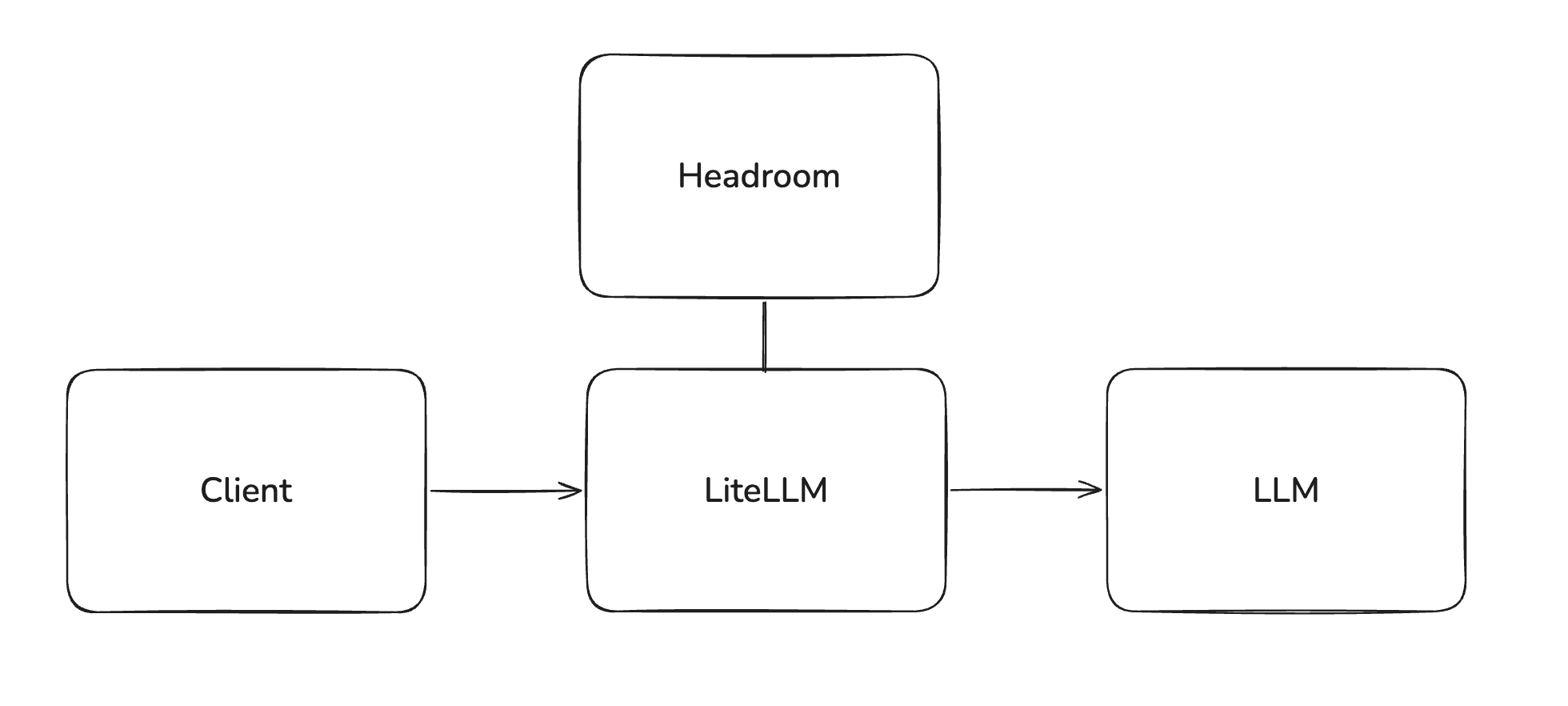
Headroom runs as a sidecar service alongside LiteLLM. Client traffic continues to hit the LiteLLM gateway as usual; LiteLLM calls Headroom in-process during the pre_call step to rewrite the messages, then forwards the compressed payload to the upstream LLM. The client and the upstream LLM provider do not talk to Headroom directly.
Requirements
LiteLLM v1.92.x or later, and a reachable Headroom proxy. See Deploy Headroom below for a one-file Dockerfile.
For testing ahead of the stable cut, use the v1.92.0-dev.1 dev release.
Quick Start
1. Define the guardrail in your config
model_list:
  - model_name: claude-sonnet-5
    litellm_params:
      model: anthropic/claude-sonnet-5
      api_key: os.environ/ANTHROPIC_API_KEY

guardrails:
  - guardrail_name: headroom-compression
    litellm_params:
      guardrail: headroom
      mode: pre_call
      api_base: https://your-headroom-service
#     api_key: os.environ/HEADROOM_API_KEY  [OPTIONAL]
#     default_on: true [OPTIONAL]
Only pre_call is meaningful; the guardrail is a no-op on responses.
Add default_on: true if you want every request through the proxy to be compressed. Leave it off if you want compression to be opt-in (recommended when rolling out to a subset of users or workloads).
2. Start the LiteLLM gateway
litellm --config config.yaml
3. Send a request
- OpenAI format
- Anthropic format
curl -i http://0.0.0.0:4000/v1/chat/completions \
  -H "Content-Type: application/json" \
  -d '{
    "model": "claude-sonnet-5",
    "messages": [
      {"role": "system", "content": "You are a helpful assistant."},
      {"role": "user", "content": "Summarize the prior conversation..."}
    ],
    "guardrails": ["headroom-compression"]
  }'
curl -i http://0.0.0.0:4000/v1/messages \
  -H "Content-Type: application/json" \
  -H "anthropic-version: 2023-06-01" \
  -d '{
    "model": "claude-sonnet-5",
    "max_tokens": 1024,
    "messages": [
      {"role": "user", "content": "Summarize the prior conversation..."}
    ],
    "litellm_metadata": {"guardrails": ["headroom-compression"]}
  }'
The messages are sent to the headroom service at {api_base}/v1/compress with the JSON body {"messages": [...], "model": "<model>"}. The returned messages list replaces the request payload before the LLM call.
Enabling compression per key
When default_on is not set, compression runs only for requests that opt in. The typical admin pattern is to attach the guardrail to a virtual key so the developer using the key gets compression automatically, without changing their client code.
Create a key with Headroom attached:
curl -X POST 'http://0.0.0.0:4000/key/generate' \
  -H "Authorization: Bearer $LITELLM_API_KEY" \
  -H 'Content-Type: application/json' \
  -d '{
        "guardrails": ["headroom-compression"]
      }'
Every request made with the returned key will run through headroom-compression before reaching the LLM. To attach to an existing key, use /key/update with the same guardrails field.
Enabling compression per request
Clients can opt in on a single call without admin involvement.
- OpenAI format
- Anthropic format
Pass a guardrails array in the request body:
curl -i http://0.0.0.0:4000/v1/chat/completions \
  -H "Content-Type: application/json" \
  -H "Authorization: Bearer sk-..." \
  -d '{
    "model": "claude-sonnet-5",
    "messages": [...],
    "guardrails": ["headroom-compression"]
  }'
/v1/messages does not have a top-level guardrails field, so opt in via litellm_metadata:
curl -i http://0.0.0.0:4000/v1/messages \
  -H "Content-Type: application/json" \
  -H "Authorization: Bearer sk-..." \
  -d '{
    "model": "claude-sonnet-5",
    "max_tokens": 1024,
    "messages": [...],
    "litellm_metadata": {"guardrails": ["headroom-compression"]}
  }'
The response includes an x-litellm-applied-guardrails: headroom-compression header so the caller can confirm compression actually ran.
x-headroom-bypass only ever switches compression off
LiteLLM decides whether headroom-compression runs on a given request before the guardrail's own code ever sees a header: that decision comes from default_on in config.yaml, whether the guardrail is attached to the caller's key or team, or the per-request guardrails / litellm_metadata.guardrails opt-in shown above. Only after that decision comes back "run it" does the guardrail check x-headroom-bypass, and the only value it treats as a bypass is the literal string true, matched case-insensitively. Any other value, including false, an empty header, or no header at all, has no effect and leaves the guardrail running as already scheduled.
Concretely: with default_on: false and no headroom-compression attached to the caller's key, sending x-headroom-bypass: false does not turn compression on for that request, and there is no per-request header that does. Skipping compression per request works (x-headroom-bypass: true, as in the Claude Code section above); enabling it per request without admin involvement requires the guardrails / litellm_metadata.guardrails field, not a header.
Compression behind an auto router
A request an auto router serves makes two calls, one to classify the request and one to the model it routes to. By default both see the same compressed text. From v1.101.0 the router can name a compression guardrail per hop, or none for either, with auto_router_routing_compression and auto_router_model_compression. Setting either field puts the router in charge of compression for its own requests and suppresses the guardrails above for them, whether they were attached to a key, a team, or the request body. See Compression.
Claude Code usage
This is the most common rollout: a platform admin wants to cut input token spend for a team that drives heavy traffic through Claude Code without asking each developer to change their setup.
The flow has three steps.
Admin: register Headroom in config.yaml. Define headroom-compression as shown in the Quick Start. Leave default_on off so only opted-in keys get compression.
Admin: issue a per-developer key with Headroom attached. Each developer gets a virtual key that has the guardrail bound to it.
curl -X POST 'http://0.0.0.0:4000/key/generate' \
  -H "Authorization: Bearer $LITELLM_API_KEY" \
  -H 'Content-Type: application/json' \
  -d '{
        "key_alias": "claude-code-alice",
        "guardrails": ["headroom-compression"],
        "models": ["claude-sonnet-5"],
        "metadata": {"team": "claude-code-rollout"}
      }'
Developer: point Claude Code at the proxy. No code change is needed; Claude Code reads ANTHROPIC_BASE_URL and ANTHROPIC_AUTH_TOKEN from the environment.
export ANTHROPIC_BASE_URL="https://your-litellm-proxy.example.com"
export ANTHROPIC_AUTH_TOKEN="sk-the-key-the-admin-issued"

claude
From here, every /v1/messages request Claude Code makes is compressed by Headroom before being dispatched to Anthropic. The developer sees no behavioral change other than lower token usage on their spend log. To verify compression ran, the admin can inspect guardrail_information on the corresponding spend log row, or check the response headers for x-litellm-applied-guardrails: headroom-compression.
If a developer wants to skip compression for one request (for example, to compare an uncompressed baseline), they can set the x-headroom-bypass: true header on that call.
Validate Headroom ran
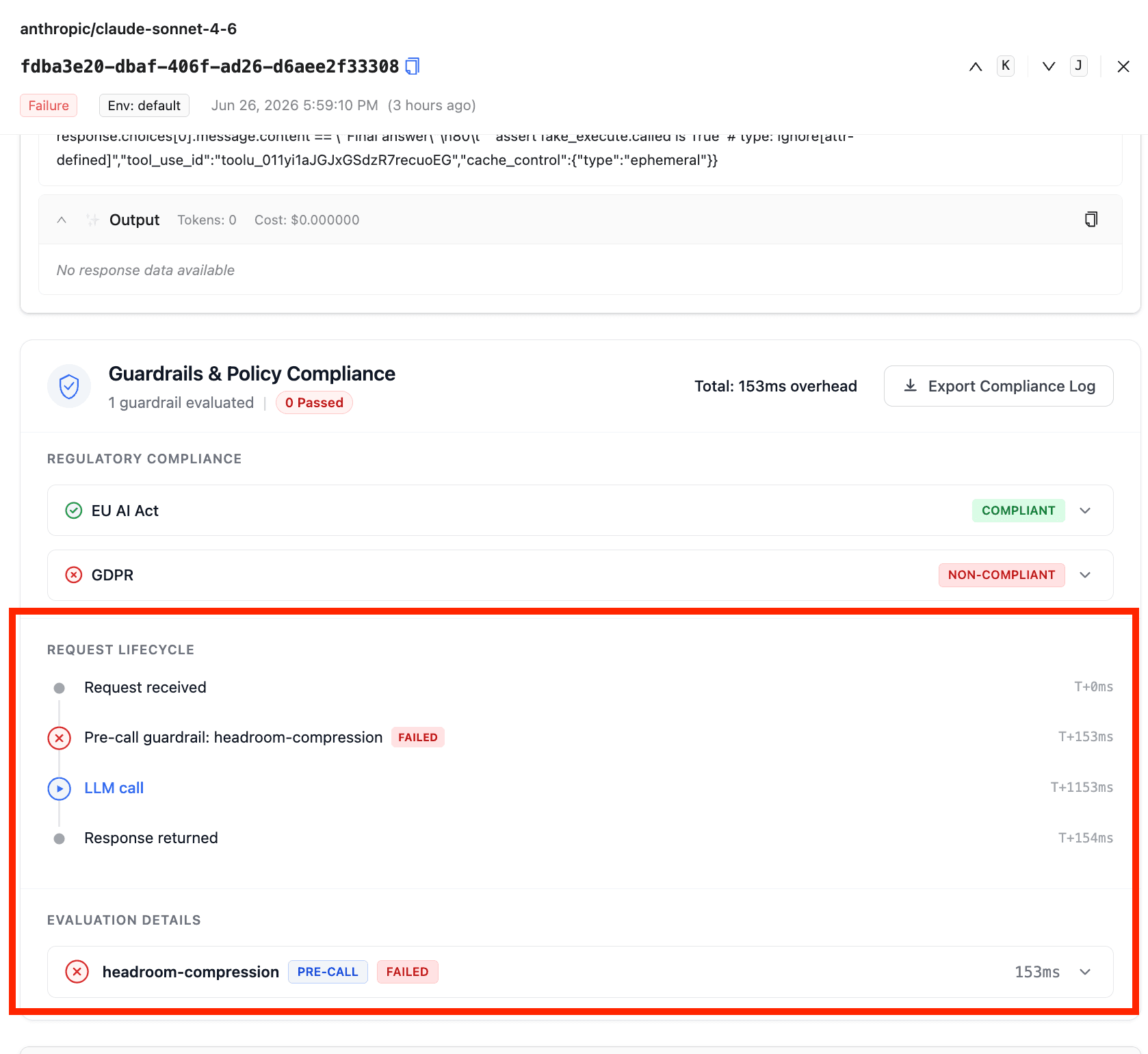
In the Admin UI, open any request in Logs, scroll to the Guardrails & Policy Compliance panel, and you will see headroom-compression listed under Request Lifecycle as a pre-call step with its latency, plus an entry under Evaluation Details.
Deploy Headroom
Here is the dockerfile for deploying the headroom proxy
FROM python:3.13-slim

RUN apt-get update \
    && apt-get install -y --no-install-recommends build-essential \
    && pip install --no-cache-dir "headroom-ai[proxy]==0.27.0" \
    && apt-get purge -y build-essential \
    && apt-get autoremove -y \
    && rm -rf /var/lib/apt/lists/*

EXPOSE 8787
ENV HEADROOM_TELEMETRY=off
CMD ["headroom", "proxy", "--host", "0.0.0.0", "--port", "8787"]
Why requests_compressed can be 0
Headroom protects two message types by default, set on the Headroom container itself, not in LiteLLM's config.yaml:
user/systemmessages, unlessENV HEADROOM_COMPRESS_USER_MESSAGES=1is set. Most Claude Code traffic isuserrole, so a default deployment compresses none of it.- Messages with an Anthropic
cache_controlmarker, always. Compressing them would break prompt-cache byte matching. No override exists.
Configuration reference
| Param | Type | Description |
|---|---|---|
guardrail | str | Must be headroom. |
mode | str | Use pre_call. The guardrail is a no-op on responses. |
api_base | str | Base URL of the headroom service. Falls back to the HEADROOM_API_BASE env var. Required. |
api_key | str | Bearer token for the headroom service. Falls back to HEADROOM_API_KEY. Optional. |
model | str | Model name forwarded to /v1/compress. Defaults to the request's model field. |
default_on | bool | Run the guardrail on every request without needing to opt in per call. Defaults to false. |
Environment variables
| Variable | Description |
|---|---|
HEADROOM_API_BASE | Fallback for api_base when not set in the guardrail config. |
HEADROOM_API_KEY | Fallback for api_key when not set in the guardrail config. |

