Auto-Inject Prompt Caching Checkpoints
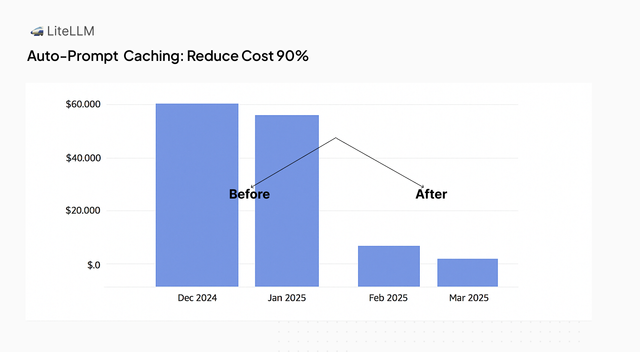
Reduce costs by up to 90% by using LiteLLM to auto-inject prompt caching checkpoints.
Supported Providers (cache_control marker):
- Anthropic API (
anthropic/) - AWS Bedrock - Claude (
bedrock/) - Vertex AI - Claude and Gemini (
vertex_ai/) - Google AI Studio - Gemini (
gemini/) - Azure AI - Claude (
azure_ai/) - OpenRouter - Claude, Gemini, MiniMax, GLM, z-ai routes (
openrouter/) - Databricks - Claude (
databricks/) - DashScope / Qwen (
dashscope/) - MiniMax (
minimax/) - Z.ai / GLM (
zai/)
Supported Providers (prompt_cache_breakpoint marker):
- OpenAI GPT-5.6 and newer (
openai/), see OpenAI GPT-5.6 and newer - Bedrock Mantle, OpenAI GPT-5.6 and newer (
bedrock_mantle/openai.gpt-5.6-*,bedrock_mantle/openai.gpt-6*), through the same section, on/chat/completions(bridged onto the Responses API) and/v1/responses; see Bedrock Mantle explicit breakpoints for Mantle's limits
Provider Managed (automatic, no marker needed):
- OpenAI, models before GPT-5.6 (
openai/) - DeepSeek (
deepseek/) - xAI (
xai/) - Gemini 2.5 and newer (
gemini/,vertex_ai/), through Google's implicit caching
Gemini 2.5 and newer models cache repeated prefixes on their own, with no marker and no extra cost. Adding cache_control_injection_points to a Gemini deployment switches it to Google's explicit context caching: LiteLLM moves the marked messages out of the request into a separate cachedContents object and sends only a reference to it. That prefix is no longer part of the request, so implicit caching stops applying to it, and Google bills storage for every cache object LiteLLM creates. For most Gemini traffic the better setup is no injection points at all. Use them only when you need a guaranteed discount on a large, stable prefix that is reused often enough to cover the storage cost
Injection points were built for Anthropic-style caching, where nothing is cached unless the request carries a cache_control marker. Providers that cache automatically (Gemini 2.5+, OpenAI, DeepSeek, xAI) do not need them
How it works
LiteLLM can automatically inject prompt caching checkpoints into your requests to LLM providers. This allows:
- Cost Reduction: Long, static parts of your prompts can be cached to avoid repeated processing
- No need to modify your application code: You can configure the auto-caching behavior in the LiteLLM UI or in the
litellm config.yamlfile.
Who the cache is shared with
This is provider-side prompt caching, a different feature from LiteLLM response caching. It needs no Redis.
- The provider caches a prefix against the upstream credentials that sent it, not against the LiteLLM key, team or end user.
- Anyone whose request repeats that prefix exactly reuses it. That sharing is the point: a long system prompt cached by one user is reused by everyone else on the same credentials, and an agent benefits from a prefix a user already cached.
- The flip side: responses report
cache_read_input_tokens, and a cache hit is faster, so a caller repeating a prefix exactly can tell someone else on those credentials sent it recently. - That is bounded. The prefix must match exactly, and providers will not cache a prefix below a minimum size (for Anthropic that is model-dependent, currently 1k to 4k tokens), so it reveals whether a prompt the caller already holds was sent, not its contents.
- For isolation, give tenants separate credentials. The boundary is the provider account, not anything LiteLLM can enforce.
Automatic checkpoints for Claude models
Since v1.94.0Everything below asks you to decide where the checkpoints go. If all you want is the common case for Claude, one flag does it for you.
litellm_settings:
  enable_anthropic_prompt_caching: true
Or, without a config file:
export LITELLM_ENABLE_ANTHROPIC_PROMPT_CACHING=true
It is also a switch on the Admin UI, on the General tab under Router Settings.
What it actually does
It adds the same cache_control_injection_points you would have written by hand, one checkpoint on the system prompt and one on the trailing turn, so the stable prefix stays cached while the checkpoint advances with the conversation. That is what a client like Claude Code needs, since it never sets cache_control itself.
- Off by default. Upgrading changes nothing until you enable it.
- Claude only.
anthropic/andbedrock/models the cost map marks as supporting prompt caching. Claude onvertex_ai/andazure_ai/is not covered; usecache_control_injection_pointsfor those. - Never double-injects. If the request already carries its own
cache_control, LiteLLM stands down and the client's checkpoints win. - Explicit config wins. The flag only fills in when no
cache_control_injection_pointsare set. - Respects the 4 block provider limit, counting client-supplied blocks toward it.
- Works on
/v1/messagesand/chat/completions.
Cache lifetime
The default is Anthropic's 5 minute ephemeral cache, which is their API default and what Claude Code uses. For long agentic sessions you can ask for the 1 hour cache instead:
litellm_settings:
  enable_anthropic_prompt_caching: true
  anthropic_prompt_caching_ttl: "1h"
The equivalent environment variable is LITELLM_ANTHROPIC_PROMPT_CACHING_TTL, and the Admin UI exposes it as a dropdown. Note that a 1 hour cache write costs more than a 5 minute one, so it pays off only when the prefix is reused over a longer session.
litellm_settings wins over the environment variable when both are set, since the config is applied after startup.
When to use injection points instead
Reach for cache_control_injection_points, described below, when you need a provider the flag does not cover, a checkpoint somewhere other than the system prompt and the trailing turn, per-model rather than gateway-wide behavior, or location: tool_config to cache tool definitions.
Configuration
You need to specify cache_control_injection_points in your model configuration. This tells LiteLLM:
- Where to add the caching directive (
location) - Which message to target (
role)
LiteLLM will then automatically add a cache_control directive to the specified messages in your requests:
"cache_control": {
    "type": "ephemeral"
}
Configured points are added beside any cache_control the request already carries. A message the client marked itself is left as is, and a point that would take the request past Anthropic's limit of 4 cached blocks is skipped, counting the client's own marks first, tools included
OpenAI GPT-5.6 and newer
The same cache_control_injection_points work when the deployment resolves to an OpenAI model that supports explicit prompt cache breakpoints, which the cost map marks with supports_prompt_cache_breakpoint (GPT-5.6 and newer on openai/). LiteLLM looks at the resolved deployment, not at the shape of the incoming request, so one config pattern covers a mixed Anthropic and OpenAI fleet and Anthropic-shaped clients on /v1/messages get the OpenAI markers too
| Anthropic target | OpenAI GPT-5.6+ target |
|---|---|
"cache_control": {"type": "ephemeral"} on the targeted block | "prompt_cache_breakpoint": {"mode": "explicit"} on the targeted block |
| nothing at the request level | "prompt_cache_options": {"mode": "implicit"} at the request root |
control.ttl picks the 5m or 1h cache | control is ignored; set prompt_cache_options yourself for ttl |
The block marker pins where OpenAI writes the cache. The request-level prompt_cache_options LiteLLM adds is {"mode": "implicit"}, so OpenAI keeps its own automatic checkpoint on the latest user or tool message beside the ones you configured and also looks up earlier message boundaries, which is what lets a growing agent conversation reuse the previous turn's prefix instead of rewriting everything after the static prefix on every turn. Releases before PR #42281 (/chat/completions and /v1/responses) and PR #45121 (/v1/messages) sent {"mode": "explicit"} here, which made the configured checkpoints the only cache boundaries. A prompt_cache_options already on the request wins and is never overwritten, which is how you pin the mode or ask for the 30 minute cache per deployment:
model_list:
  - model_name: gpt-5.6
    litellm_params:
      model: openai/gpt-5.6
      api_key: os.environ/OPENAI_API_KEY
      cache_control_injection_points:
        - location: message
          role: system
      prompt_cache_options:
        mode: explicit
        ttl: 30m
With mode: explicit only the configured checkpoints write to the cache, which suits many single-turn requests that share one long system prompt, since each request's unique tail is never written. The default implicit suits long multi-turn sessions. Either way OpenAI serves reads from the longest cached prefix it can match. The four write slots are shared: in implicit mode OpenAI's automatic checkpoint takes one, leaving three for configured and client marks, and OpenAI does not reject a request that carries more
What LiteLLM sends by default
| Scenario | On the targeted block | At the request root | What OpenAI does |
|---|---|---|---|
A configured point lands on /chat/completions, /v1/responses or /v1/messages (Anthropic SDK, Claude Code) and nothing set prompt_cache_options | prompt_cache_breakpoint: {"mode": "explicit"} | {"mode": "implicit"}, added by LiteLLM | writes at your checkpoints and at its automatic one, reads the longest cached prefix |
Same, but the deployment's litellm_params or the request already carries prompt_cache_options | same | yours, mode and ttl untouched | whatever you chose |
| No configured point lands, for example no message with the configured role | nothing | nothing added | its default, implicit caching |
The client sends its own prompt_cache_breakpoint marks | the client's are kept and configured ones are added beside them, up to the limit of 4 | the client's prompt_cache_options if it sent one, else {"mode": "implicit"} as in the first row | as above |
Custom api_base without prompt_cache_options on the deployment | Anthropic cache_control, which OpenAI strips | nothing added | its default, implicit caching |
Custom api_base with prompt_cache_options in litellm_params | prompt_cache_breakpoint: {"mode": "explicit"} | yours | whatever you chose |
OpenAI models before GPT-5.6, Azure OpenAI, litellm_proxy/ deployments | not mapped | nothing added | provider-managed implicit caching |
What to know about the OpenAI mapping:
- Block-level only. OpenAI accepts the marker on text, image and file blocks. A string system prompt or message is wrapped into a one-block list before the marker is placed. Assistant blocks and tool results cannot carry a breakpoint, so an injection point that lands there is skipped
/v1/messagessystem prompt. OpenAI does not accept a breakpoint on the top-levelinstructionsfield, so when the Anthropicsystemcarries a checkpoint LiteLLM sends it as a leadingdevelopermessage instead. OpenAI treats both shapes as the same cache prefix, so switching does not cold-start the cache- Applies beside client markers. A request that already carries its own
cache_controlorprompt_cache_breakpointmarkers keeps them and the configured points are added next to them; a target the client already marked is left as is. Claude Code sets its owncache_control, which OpenAI never sees, so a Claude Code session on a GPT-5.6 deployment with configured points runs on the checkpoints you configured plus OpenAI's automatic one, in implicit mode like every other endpoint - Respects the 4 breakpoint limit, counting client-supplied markers first, so a configured point that would be the fifth is skipped
- Only for requests that go to OpenAI itself. The mapping fires for a GPT-5.6 or newer OpenAI model (the cost map's
supports_prompt_cache_breakpointflag when the entry carries one, otherwise the GPT version in the model name) when the deployment talks toapi.openai.com(or a regional*.api.openai.comhost), meaning noapi_base(orbase_url) or one on those hosts. A deployment with a customapi_base, such as another LiteLLM proxy or gateway in front of OpenAI, keeps today's behavior unless itslitellm_paramsalso setprompt_cache_options, which opts it in.litellm_proxy/deployments and Azure OpenAI deployments are not covered yet /v1/responses. The marker lands oninput_textblocks of the targeted message, and a string message is wrapped into a one-block list first. OpenAI does not accept a marker on the top-levelinstructionsfield, so a system prompt sent there stays on implicit caching; send it as adeveloperorsystemmessage to get the checkpoint. Aprompt_cache_optionsthe client sends is forwarded as is- Cost reporting is unchanged. OpenAI's
cached_tokensandcache_write_tokensalready come back ascache_read_input_tokensandcache_creation_input_tokenson/v1/messagesand asprompt_tokens_detailson/chat/completions
LiteLLM Python SDK Usage
Use the cache_control_injection_points parameter in your completion calls to automatically inject caching directives.
Basic Example - Cache System Messages
from litellm import completion
import os

os.environ["ANTHROPIC_API_KEY"] = ""

response = completion(
    model="anthropic/claude-sonnet-5",
    messages=[
        {
            "role": "system",
            "content": [
                {
                    "type": "text",
                    "text": "You are an AI assistant tasked with analyzing legal documents.",
                },
                {
                    "type": "text",
                    "text": "Here is the full text of a complex legal agreement" * 400,
                },
            ],
        },
        {
            "role": "user",
            "content": "what are the key terms and conditions in this agreement?",
        },
    ],
    # Auto-inject cache control to system messages
    cache_control_injection_points=[
        {
            "location": "message",
            "role": "system",
        }
    ],
)

print(response.usage)
Key Points:
- Use
cache_control_injection_pointsparameter to specify where to inject caching location: "message"targets messages in the conversationrole: "system"targets all system messages- LiteLLM automatically adds
cache_controlto the last content block of matching messages (per Anthropic's API specification)
LiteLLM's Modified Request:
LiteLLM automatically transforms your request by adding cache_control to the last content block of the system message:
{
    "messages": [
        {
            "role": "system",
            "content": [
                {
                    "type": "text",
                    "text": "You are an AI assistant tasked with analyzing legal documents."
                },
                {
                    "type": "text",
                    "text": "Here is the full text of a complex legal agreement...",
                    "cache_control": {"type": "ephemeral"}  // Added by LiteLLM
                }
            ]
        },
        {
            "role": "user",
            "content": "what are the key terms and conditions in this agreement?"
        }
    ]
}
Target Specific Messages by Index
You can target specific messages by their index in the messages array. Use negative indices to target from the end.
from litellm import completion
import os

os.environ["ANTHROPIC_API_KEY"] = ""

response = completion(
    model="anthropic/claude-sonnet-5",
    messages=[
        {
            "role": "user",
            "content": "First message",
        },
        {
            "role": "assistant",
            "content": "Response to first",
        },
        {
            "role": "user",
            "content": [
                {"type": "text", "text": "Here is a long document to analyze:"},
                {"type": "text", "text": "Document content..." * 500},
            ],
        },
    ],
    # Target the last message (index -1)
    cache_control_injection_points=[
        {
            "location": "message",
            "index": -1,  # -1 targets the last message, -2 would target second-to-last, etc.
        }
    ],
)

print(response.usage)
Important Notes:
- When a message has multiple content blocks (like images or multiple text blocks),
cache_controlis only added to the last content block - This follows Anthropic's API specification which requires: "When using multiple content blocks, only the last content block can have cache_control"
- Anthropic has a maximum of 4 blocks with
cache_controlper request
LiteLLM's Modified Request:
LiteLLM adds cache_control to the last content block of the targeted message (index -1 = last message):
{
    "messages": [
        {
            "role": "user",
            "content": "First message"
        },
        {
            "role": "assistant",
            "content": "Response to first"
        },
        {
            "role": "user",
            "content": [
                {
                    "type": "text",
                    "text": "Here is a long document to analyze:"
                },
                {
                    "type": "text",
                    "text": "Document content...",
                    "cache_control": {"type": "ephemeral"}  // Added by LiteLLM to last content block only
                }
            ]
        }
    ]
}
LiteLLM Proxy Usage
You can configure cache control injection in the proxy configuration file.
- litellm config.yaml
- LiteLLM UI
model_list:
  - model_name: anthropic-auto-inject-cache-system-message
    litellm_params:
      model: anthropic/claude-sonnet-5
      api_key: os.environ/ANTHROPIC_API_KEY
      cache_control_injection_points:
        - location: message
          role: system
  - model_name: gpt-5.6
    litellm_params:
      model: openai/gpt-5.6
      api_key: os.environ/OPENAI_API_KEY
      cache_control_injection_points:
        - location: message
          role: system
The second entry resolves to an OpenAI GPT-5.6 model, so the same injection point becomes a prompt_cache_breakpoint marker plus prompt_cache_options on the outbound request, as described in OpenAI GPT-5.6 and newer
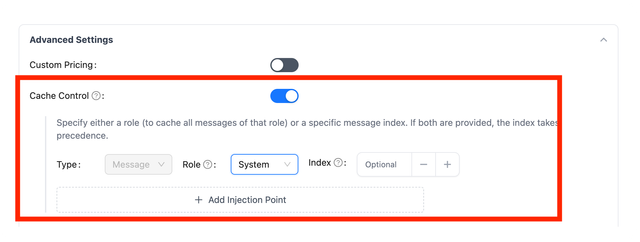
On the LiteLLM UI, you can specify the cache_control_injection_points in the Advanced Settings tab when adding a model.
Detailed Example
1. Original Request to LiteLLM
In this example, we have a very long, static system message and a varying user message. It's efficient to cache the system message since it rarely changes.
{
    "messages": [
        {
            "role": "system",
            "content": [
                {
                    "type": "text",
                    "text": "You are a helpful assistant. This is a set of very long instructions that you will follow. Here is a legal document that you will use to answer the user's question."
                }
            ]
        },
        {
            "role": "user",
            "content": [
                {
                    "type": "text",
                    "text": "What is the main topic of this legal document?"
                }
            ]
        }
    ]
}
2. LiteLLM's Modified Request
LiteLLM auto-injects the caching directive into the system message based on our configuration:
{
    "messages": [
        {
            "role": "system",
            "content": [
                {
                    "type": "text",
                    "text": "You are a helpful assistant. This is a set of very long instructions that you will follow. Here is a legal document that you will use to answer the user's question.",
                    "cache_control": {"type": "ephemeral"}
                }
            ]
        },
        {
            "role": "user",
            "content": [
                {
                    "type": "text",
                    "text": "What is the main topic of this legal document?"
                }
            ]
        }
    ]
}
When the model provider processes this request, it will recognize the caching directive and only process the system message once, caching it for subsequent requests.
3. The same request on an OpenAI GPT-5.6 deployment
With the deployment pointing at openai/gpt-5.6 instead, the same configuration produces OpenAI's explicit breakpoint on the block and implicit mode at the request root, so the system prompt is a fixed cache boundary and OpenAI's own checkpoint still follows the latest message:
{
    "prompt_cache_options": {"mode": "implicit"},
    "messages": [
        {
            "role": "system",
            "content": [
                {
                    "type": "text",
                    "text": "You are a helpful assistant. This is a set of very long instructions that you will follow. Here is a legal document that you will use to answer the user's question.",
                    "prompt_cache_breakpoint": {"mode": "explicit"}
                }
            ]
        },
        {
            "role": "user",
            "content": [
                {
                    "type": "text",
                    "text": "What is the main topic of this legal document?"
                }
            ]
        }
    ]
}
Related Documentation
- Manual Prompt Caching - Learn how to manually add
cache_controldirectives to your messages

