[Beta] Routing based on request metadata
Create routing rules based on request metadata.
Setup
Add the following to your litellm proxy config yaml file.
router_settings:
  enable_tag_filtering: True # Key Change
1. Create a tag
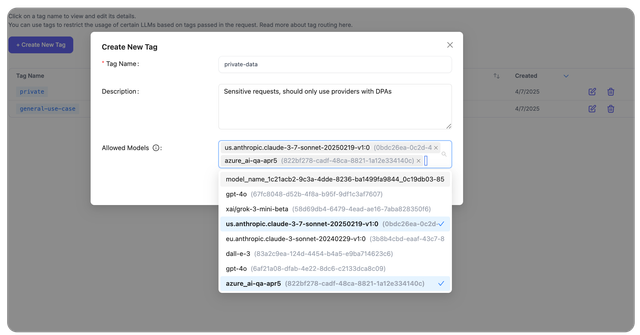
On the LiteLLM UI, navigate to Experimental > Tag Management > Create Tag.
Create a tag called private-data and only select the allowed models for requests with this tag. Once created, you will see the tag in the Tag Management page.
2. Test Tag Routing
Now we will test the tag based routing rules.
2.1 Invalid model
This request will fail since we send tags=["private-data"] but the model gpt-6.1-sol is not in the allowed models for the private-data tag.
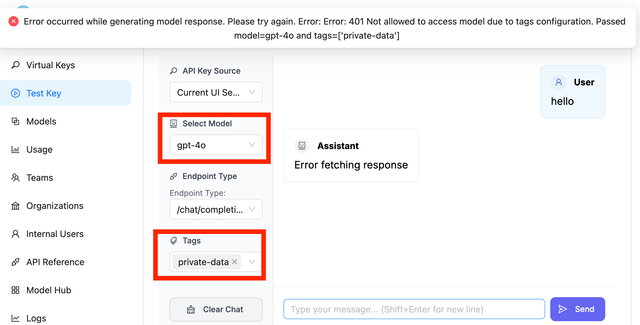
Here is an example sending the same request using the OpenAI Python SDK.
- OpenAI Python SDK
- cURL
from openai import OpenAI

client = OpenAI(
    api_key="sk-<your-litellm-api-key>",
    base_url="http://0.0.0.0:4000/v1/"
)

response = client.chat.completions.create(
    model="gpt-6.1-sol",
    messages=[
        {"role": "user", "content": "Hello, how are you?"}
    ],
    extra_body={
        "tags": ["private-data"]
    }
)
curl -L -X POST 'http://0.0.0.0:4000/v1/chat/completions' \
-H 'Content-Type: application/json' \
-H "Authorization: Bearer $LITELLM_API_KEY" \
-d '{
  "model": "gpt-6.1-sol",
  "messages": [
    {
      "role": "user",
      "content": "Hello, how are you?"
    }
  ],
  "tags": ["private-data"]
}'
2.2 Valid model
This request will succeed since we send tags=["private-data"] and the model us.anthropic.claude-sonnet-5 is in the allowed models for the private-data tag.
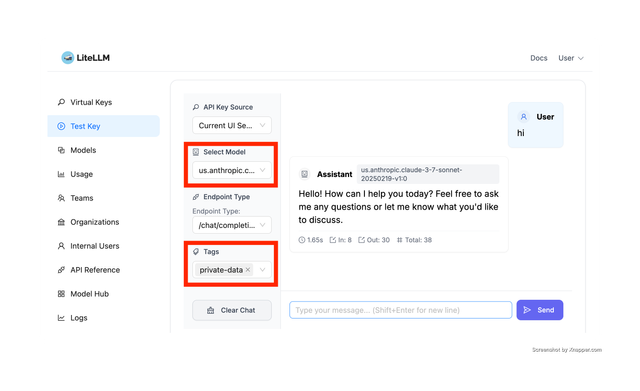
Here is an example sending the same request using the OpenAI Python SDK.
- OpenAI Python SDK
- cURL
from openai import OpenAI

client = OpenAI(
    api_key="sk-<your-litellm-api-key>",
    base_url="http://0.0.0.0:4000/v1/"
)

response = client.chat.completions.create(
    model="us.anthropic.claude-sonnet-5",
    messages=[
        {"role": "user", "content": "Hello, how are you?"}
    ],
    extra_body={
        "tags": ["private-data"]
    }
)
curl -L -X POST 'http://0.0.0.0:4000/v1/chat/completions' \
-H 'Content-Type: application/json' \
-H "Authorization: Bearer $LITELLM_API_KEY" \
-d '{
  "model": "us.anthropic.claude-sonnet-5",
  "messages": [
    {
      "role": "user",
      "content": "Hello, how are you?"
    }
  ],
  "tags": ["private-data"]
}'

