MCP from OpenAPI Specs
LiteLLM can convert any OpenAPI/Swagger spec into an MCP server, with no custom MCP server code required.
Step 1: Add the MCP Server
Add your OpenAPI-based server in config.yaml:
mcp_servers:
  petstore_mcp:
    url: "https://petstore.swagger.io/v2"
    spec_path: "/path/to/openapi.json"
    auth_type: "none"

  my_api_mcp:
    url: "http://0.0.0.0:8090"
    spec_path: "/path/to/openapi.json"
    auth_type: "api_key"
    auth_value: "your-api-key-here"

  secured_api_mcp:
    url: "https://api.example.com"
    spec_path: "/path/to/openapi.json"
    auth_type: "bearer_token"
    auth_value: "your-bearer-token"
Or from the UI: go to MCP Servers → Add New MCP Server, fill in the URL and spec path, and LiteLLM will fetch the spec and load all endpoints as tools.
Configuration parameters:
| Parameter | Required | Description |
|---|---|---|
url | Yes | Base URL of your API |
spec_path | Yes | Path or URL to your OpenAPI spec (JSON or YAML) |
auth_type | No | none, api_key, bearer_token, basic, authorization, oauth2 |
auth_value | No | Auth value (required if auth_type is set) |
description | No | Optional description |
allowed_tools | No | Allowlist of specific tools |
disallowed_tools | No | Blocklist of specific tools |
Supported spec versions: OpenAPI 3.0.x, 3.1.x, Swagger 2.0. Each operation's operationId becomes the tool name, so make sure they're unique.
Internal spec URLs (SSRF)
When spec_path is an http:// or https:// URL, the LiteLLM proxy fetches it with SSRF protection enabled by default: the hostname is resolved and the request is rejected if any resolved address is not globally routable (e.g. 10.x, 192.168.x, 127.0.0.1), unless you allowlist the hostname from the URL (not the resolved IP).
Typical cases:
- Spec URL uses
https://api.example.com/...but DNS inside your network returns a private IP. Addapi.example.comto the allowlist (orapi.example.com:443if you pin the port). - Spec URL is
http://127.0.0.1:8080/openapi.json. Add127.0.0.1or127.0.0.1:8080.
Configure under litellm_settings in your proxy config.yaml (this is not read from general_settings):
litellm_settings:
  user_url_validation: true # default; set false only if you fully trust URL sources
  user_url_allowed_hosts:
    - "api.example.com"
    - "127.0.0.1"
    - "127.0.0.1:8080"
For a full reference of these fields, see config settings: litellm_settings.
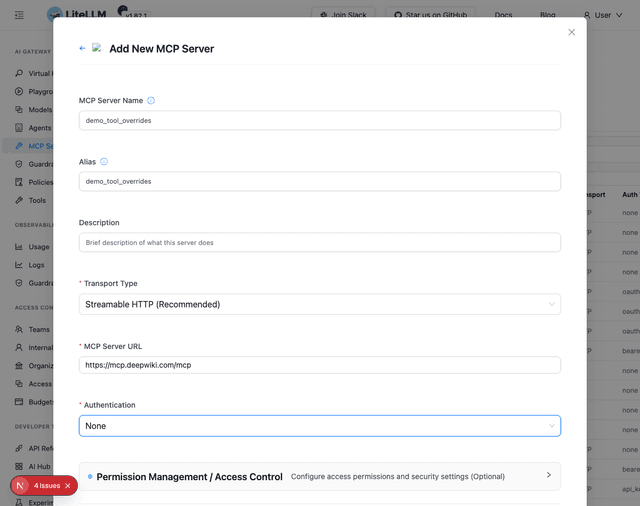
Once tools are loaded, you'll see them in the Tool Configuration section:
Step 2: Optionally Override Tool Names and Descriptions
By default, tool names and descriptions come from the operationId and description fields in your spec. You can rename or rewrite them so MCP clients see something cleaner, without touching the upstream spec.
From the UI
Each tool card has a pencil icon. Click it to open the inline editor:
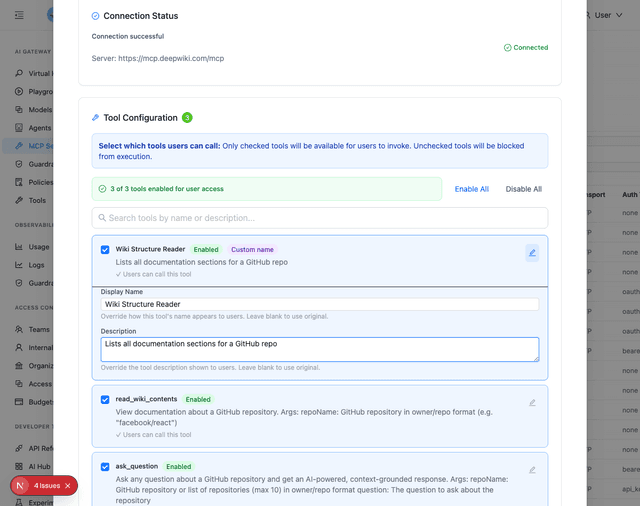
- Display Name — overrides the name MCP clients see
- Description — overrides the description MCP clients see. It goes through the same discovery guardrail scan as the spec's text, so a guardrail can mask or hide it too
- Leave a field blank to keep the original from the spec
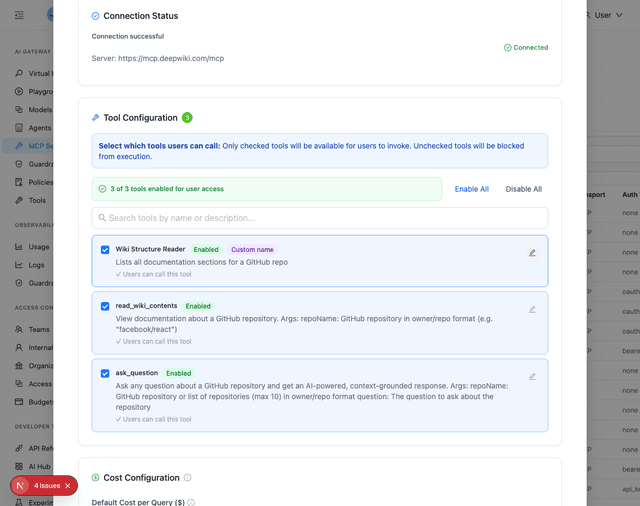
After setting overrides, a purple Custom name badge appears on the tool card:
From the API
Pass tool_name_to_display_name and tool_name_to_description in the create or update request:
curl -X POST http://localhost:4000/v1/mcp/server \
  -H "Authorization: Bearer $LITELLM_MASTER_KEY" \
  -H "Content-Type: application/json" \
  -d '{
    "name": "petstore_mcp",
    "url": "https://petstore.swagger.io/v2",
    "spec_path": "/path/to/openapi.json",
    "tool_name_to_display_name": {
      "getPetById": "Get Pet",
      "findPetsByStatus": "List Available Pets"
    },
    "tool_name_to_description": {
      "getPetById": "Look up a pet by its ID",
      "findPetsByStatus": "Returns all pets matching a given status (available, pending, sold)"
    }
  }'
curl -X PUT http://localhost:4000/v1/mcp/server \
  -H "Authorization: Bearer $LITELLM_MASTER_KEY" \
  -H "Content-Type: application/json" \
  -d '{
    "server_id": "<server-id>",
    "tool_name_to_display_name": {
      "getPetById": "Get Pet"
    },
    "tool_name_to_description": {
      "getPetById": "Look up a pet by its ID"
    }
  }'
The map key is the original operationId from the spec, not the prefixed tool name. LiteLLM strips the server prefix before doing the lookup.
For example, if your server is petstore_mcp, the tool is exposed as petstore_mcp-getPetById. The map key is still getPetById.
Before and after:
# Without overrides
Tool: "petstore_mcp-getPetById"
Description: "Returns a single pet"

Tool: "petstore_mcp-findPetsByStatus"
Description: "Finds Pets by status"

# After overrides
Tool: "Get Pet"
Description: "Look up a pet by its ID"

Tool: "List Available Pets"
Description: "Returns all pets matching a given status (available, pending, sold)"
Using the Server
- Python FastMCP
- Cursor IDE
- OpenAI Responses API
from fastmcp import Client
import asyncio

config = {
    "mcpServers": {
        "petstore": {
            "url": "http://localhost:4000/petstore_mcp/mcp",
            "headers": {
                "x-litellm-api-key": "Bearer sk-<your-litellm-api-key>"
            }
        }
    }
}

client = Client(config)

async def main():
    async with client:
        tools = await client.list_tools()
        print(f"Available tools: {[tool.name for tool in tools]}")

        response = await client.call_tool(
            name="Get Pet",        # overridden name
            arguments={"petId": "1"}
        )
        print(f"Response: {response}")

if __name__ == "__main__":
    asyncio.run(main())
{
  "mcpServers": {
    "Petstore": {
      "url": "http://localhost:4000/petstore_mcp/mcp",
      "headers": {
        "x-litellm-api-key": "Bearer sk-<your-litellm-api-key>"
      }
    }
  }
}
curl --location 'https://api.openai.com/v1/responses' \
--header 'Content-Type: application/json' \
--header "Authorization: Bearer $OPENAI_API_KEY" \
--data '{
    "model": "gpt-6.1-sol",
    "tools": [
        {
            "type": "mcp",
            "server_label": "petstore",
            "server_url": "http://localhost:4000/petstore_mcp/mcp",
            "require_approval": "never",
            "headers": {
                "x-litellm-api-key": "Bearer YOUR_LITELLM_API_KEY"
            }
        }
    ],
    "input": "Find all available pets",
    "tool_choice": "required"
}'