SigNoz
Send LiteLLM traces to SigNoz, Cloud or self-hosted, with the signoz callback. One endpoint field covers both deployments, and under OpenTelemetry v2 each team or virtual key can send its traces to its own SigNoz account with its own ingestion key. For the SigNoz side of the setup, including dashboards and alerts, see the SigNoz LiteLLM observability docs.
Prerequisites
For SigNoz Cloud you need the ingestion endpoint for your region and an ingestion key. For self-hosted SigNoz you need the URL of the SigNoz OTel Collector's OTLP HTTP port, 4318 by default, reachable from the proxy. No extra Python packages are required; the callback uses the OTLP HTTP exporter that ships with litellm[proxy].
Quick start
Add signoz to callbacks and point it at your SigNoz instance. LITELLM_OTEL_V2=true is recommended: it gives you one trace per request covering the HTTP call, auth, guardrails, the model call and the spend write, and it is required for per-team routing. See OpenTelemetry v2 for what the v2 trace contains.
litellm_settings:
  callbacks: ["signoz"]
- SigNoz Cloud
- Self-hosted SigNoz
LITELLM_OTEL_V2=true
SIGNOZ_INGESTION_ENDPOINT="https://ingest.<region>.signoz.cloud:443"
SIGNOZ_INGESTION_KEY="<your-ingestion-key>"
Replace <region> with us, eu or in to match your SigNoz Cloud account.
LITELLM_OTEL_V2=true
SIGNOZ_INGESTION_ENDPOINT="http://<signoz-otel-collector>:4318"
Leave SIGNOZ_INGESTION_KEY unset. With no key the callback sends no auth header, which is what a self-hosted collector expects. Set the key only if your collector is configured to require one.
Start the proxy and send a request:
curl -X POST 'http://localhost:4000/v1/chat/completions' \
  -H "Authorization: Bearer $LITELLM_API_KEY" -H 'Content-Type: application/json' \
  -d '{"model": "gpt-6-luna", "messages": [{"role": "user", "content": "What is SigNoz?"}]}'
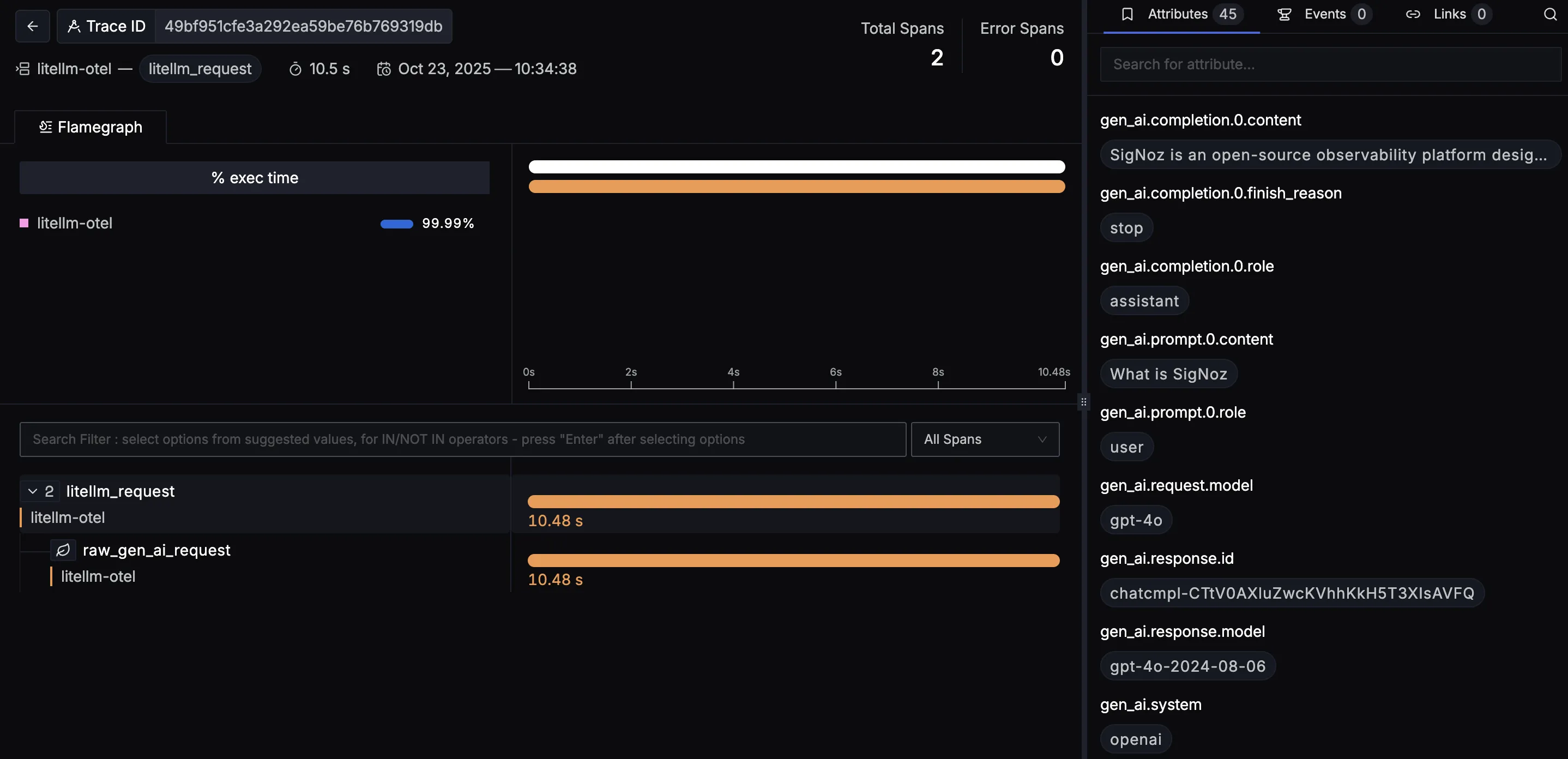
The trace appears in SigNoz under Traces for the service named by OTEL_SERVICE_NAME (default litellm), with a chat <model> span carrying the canonical gen_ai.* attributes for model, provider, token usage, cost and latency.
SIGNOZ_INGESTION_ENDPOINT is the OTLP base URL. The callback appends /v1/traces itself, and a value that already ends in /v1/traces is used as is. If the variable is unset or empty, the proxy logs an error naming SIGNOZ_INGESTION_ENDPOINT at startup and exports nothing; there is no default endpoint. The callback always speaks OTLP over HTTP; for OTLP gRPC use the generic otel callback described in Metrics and logs.
You can also enable the callback from the Admin UI under Settings > Logging & Alerts, where SigNoz appears as a tile that takes the same two values.
Metrics and logs
The signoz callback exports traces. LiteLLM's GenAI metrics and log events are not routed per vendor; they follow the proxy-wide OTLP settings, so to see them in SigNoz set the standard OpenTelemetry variables to the same destination:
LITELLM_OTEL_INTEGRATION_ENABLE_METRICS=true
OTEL_EXPORTER_OTLP_PROTOCOL="http/protobuf"
OTEL_EXPORTER_OTLP_ENDPOINT="https://ingest.<region>.signoz.cloud:443"
OTEL_EXPORTER_OTLP_HEADERS="signoz-ingestion-key=<your-ingestion-key>"
Drop OTEL_EXPORTER_OTLP_HEADERS for self-hosted SigNoz. Setting OTEL_EXPORTER_OTLP_ENDPOINT also adds a proxy-wide trace exporter, so with both blocks configured each span reaches SigNoz twice, once from the signoz exporter and once from the generic one. Either accept that, or use only the generic variables when you do not need per-team routing. The metric names and the cardinality controls are covered in Metrics.
Per-team and per-key routing
Under OTel v2 a team or a virtual key can carry its own SigNoz destination, so that team's traces land in its own SigNoz account while everyone else's stay at the proxy-wide endpoint. This is the same key/team callback mechanism as Team/Key based logging, and the general behaviour (override versus additive mode, what the tenant receives, key beating team) is described in Per-key / per-team credentials.
Requires LITELLM_OTEL_V2=true. Allowlist every tenant endpoint host first, or the proxy ignores that endpoint with a warning:
litellm_settings:
  callbacks: ["signoz"]
  provider_url_destination_allowed_hosts: ["ingest.eu.signoz.cloud"]
Register the callback on the team:
curl -X POST 'http://localhost:4000/team/<team-id>/callback' \
  -H "Authorization: Bearer $LITELLM_API_KEY" -H 'Content-Type: application/json' \
  -d '{
    "callback_name": "signoz",
    "callback_type": "success",
    "callback_vars": {
      "signoz_ingestion_endpoint": "https://ingest.eu.signoz.cloud:443",
      "signoz_ingestion_key": "<team-ingestion-key>"
    }
  }'
Or on a key, including a key with no team:
curl -X POST 'http://localhost:4000/key/generate' \
  -H "Authorization: Bearer $LITELLM_API_KEY" -H 'Content-Type: application/json' \
  -d '{
    "metadata": {
      "logging": [{
        "callback_name": "signoz",
        "callback_type": "success",
        "callback_vars": {
          "signoz_ingestion_endpoint": "https://ingest.eu.signoz.cloud:443",
          "signoz_ingestion_key": "<key-ingestion-key>"
        }
      }]
    }
  }'
The Admin UI exposes the same two fields on a team's or key's logging settings under the SigNoz tile. The ingestion key is stored encrypted and reads back masked.
A team or key SigNoz callback must carry signoz_ingestion_key. Support for routing a team to a SigNoz endpoint without a key was removed on purpose: the proxy would otherwise have to send its own ingestion key to a URL the tenant chose. A team or key that sets signoz_ingestion_endpoint on its own keeps exporting to the proxy-wide destination, and the proxy logs a warning saying so. A keyless self-hosted collector is served by the global callback only.
The two fields work together as follows. A signoz_ingestion_key on its own sends that tenant's traces to the proxy-wide endpoint with the tenant's key, which is the usual case when the operator and the team both use SigNoz Cloud in the same region. A signoz_ingestion_endpoint is honoured only when the key is set alongside it and its host is on provider_url_destination_allowed_hosts; an endpoint without a key, or on a host outside the allowlist, is ignored with a warning in the proxy log and the request stays at the proxy-wide destination with the proxy's own key. The proxy never sends its own ingestion key to a tenant URL, and a tenant's key is never attached to another backend's exporter. A team that runs a keyless self-hosted collector therefore cannot be routed per team; point the global callback at it instead. Both fields must start with http:// or https:// to be considered, and a malformed value is ignored the same way.
The fields are read from the key and team the proxy resolved at auth, never from the request body. A request whose body or metadata carries signoz_ingestion_endpoint or signoz_ingestion_key is rejected with HTTP 401 before any provider call unless general_settings.allow_client_side_credentials is true, the same rule every other callback credential follows.
Verify
GET /health/services?service=signoz returns 200 when the callback is configured and a test span was queued. Because spans are batched and sent asynchronously, this confirms configuration, not delivery; a SigNoz endpoint that is down or rejecting the key still yields 200 here. To confirm delivery, send a chat completion and look for the trace in SigNoz.
If spans do not arrive, set OTEL_EXPORTER="console" temporarily; if spans print to stdout, the problem is the endpoint or the key rather than LiteLLM. A 403 from SigNoz Cloud means the ingestion key is wrong or belongs to another region, and a 404 usually means the endpoint carries an unexpected path. In both cases the caller still gets its response; only that batch of spans is dropped, and later batches land once the destination accepts them.
Spans still queued in the batch processor when the proxy receives SIGTERM can be lost. This affects every OpenTelemetry-based callback in LiteLLM, not just SigNoz, and is tracked upstream.
Without OTel v2
The signoz callback also works with LITELLM_OTEL_V2 unset. It then uses the legacy OpenTelemetry integration: the same two environment variables, OTLP HTTP to <endpoint>/v1/traces, and the signoz-ingestion-key header when a key is set. Per-team and per-key routing is not available on this path; team or key callback_vars for SigNoz are ignored and every trace goes to the proxy-wide destination.
Dashboards
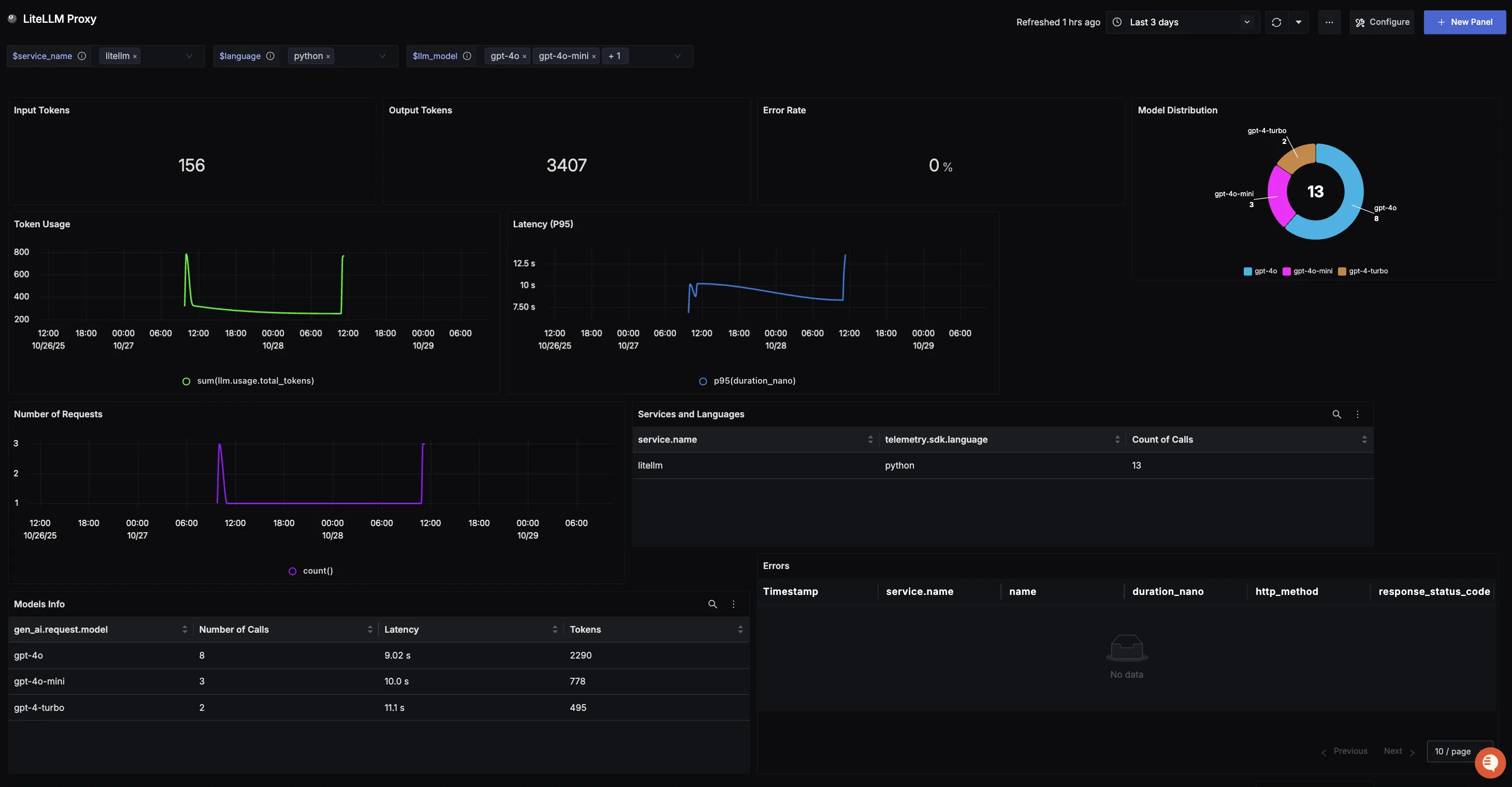
SigNoz publishes a LiteLLM Proxy dashboard and a LiteLLM SDK dashboard with import instructions.
LiteLLM SDK
The signoz callback is available in the SDK as well. Set the same environment variables and enable it before any LiteLLM call:
import litellm
from litellm import completion

litellm.callbacks = ["signoz"]

response = completion(
  model="openai/gpt-6.1-sol",
  messages=[{"content": "What is SigNoz", "role": "user"}]
)
print(response)
That covers traces. To also ship logs and metrics from an SDK application, instrument the process with the OpenTelemetry SDK and point everything at SigNoz, as shown below.
- No Code (Recommended)
- Code
No-code auto-instrumentation is the quickest path when you use standard instrumentor libraries and do not want to change application code.
Step 1: Install the packages.
uv add \
  opentelemetry-api \
  opentelemetry-distro \
  opentelemetry-exporter-otlp \
  httpx \
  opentelemetry-instrumentation-httpx \
  litellm
Step 2: Install the instrumentations for what is already in your environment.
opentelemetry-bootstrap --action=install
Step 3: Enable the LiteLLM callback in your code before any LiteLLM call.
import litellm

litellm.callbacks = ["otel"]
Step 4: Run the application under the auto-instrumentation agent.
OTEL_RESOURCE_ATTRIBUTES="service.name=<service_name>" \
OTEL_EXPORTER_OTLP_ENDPOINT="https://ingest.<region>.signoz.cloud:443" \
OTEL_EXPORTER_OTLP_HEADERS="signoz-ingestion-key=<your_ingestion_key>" \
OTEL_EXPORTER_OTLP_PROTOCOL=grpc \
OTEL_TRACES_EXPORTER=otlp \
OTEL_METRICS_EXPORTER=otlp \
OTEL_LOGS_EXPORTER=otlp \
OTEL_PYTHON_LOG_CORRELATION=true \
OTEL_PYTHON_LOGGING_AUTO_INSTRUMENTATION_ENABLED=true \
OTEL_PYTHON_DISABLED_INSTRUMENTATIONS=openai \
opentelemetry-instrument <your_run_command>
OTLP gRPC requires grpcio; install it with uv add "litellm[grpc]". OTEL_PYTHON_DISABLED_INSTRUMENTATIONS=openai turns off the OpenAI instrumentor so that LLM calls are traced once, by LiteLLM, rather than twice. Replace <service_name>, <region>, <your_ingestion_key> and <your_run_command> (for example python main.py) with your values. For self-hosted SigNoz, change the endpoint and drop the headers variable as described in Cloud to Self-Hosted.
Code-based instrumentation gives you control over resource attributes, sampling and how the exporters are built.
Step 1: Install the packages.
uv add \
  opentelemetry-api \
  opentelemetry-sdk \
  opentelemetry-exporter-otlp \
  opentelemetry-instrumentation-httpx \
  opentelemetry-instrumentation-system-metrics \
  litellm
Step 2: Set up the tracer provider.
from opentelemetry.sdk.resources import Resource
from opentelemetry.sdk.trace import TracerProvider
from opentelemetry.sdk.trace.export import BatchSpanProcessor
from opentelemetry.exporter.otlp.proto.http.trace_exporter import OTLPSpanExporter
from opentelemetry import trace
import os

resource = Resource.create({"service.name": "<service_name>"})
provider = TracerProvider(resource=resource)
span_exporter = OTLPSpanExporter(
    endpoint=os.getenv("OTEL_EXPORTER_TRACES_ENDPOINT"),
    headers={"signoz-ingestion-key": os.getenv("SIGNOZ_INGESTION_KEY")},
)
provider.add_span_processor(BatchSpanProcessor(span_exporter))
trace.set_tracer_provider(provider)
OTEL_EXPORTER_TRACES_ENDPOINT is https://ingest.<region>.signoz.cloud:443/v1/traces for your region and SIGNOZ_INGESTION_KEY is your ingestion key.
Step 3: Set up logs.
import logging
from opentelemetry.sdk.resources import Resource
from opentelemetry._logs import set_logger_provider
from opentelemetry.sdk._logs import LoggerProvider, LoggingHandler
from opentelemetry.sdk._logs.export import BatchLogRecordProcessor
from opentelemetry.exporter.otlp.proto.http._log_exporter import OTLPLogExporter
import os

resource = Resource.create({"service.name": "<service_name>"})
logger_provider = LoggerProvider(resource=resource)
set_logger_provider(logger_provider)

otlp_log_exporter = OTLPLogExporter(
    endpoint=os.getenv("OTEL_EXPORTER_LOGS_ENDPOINT"),
    headers={"signoz-ingestion-key": os.getenv("SIGNOZ_INGESTION_KEY")},
)
logger_provider.add_log_record_processor(BatchLogRecordProcessor(otlp_log_exporter))
handler = LoggingHandler(level=logging.INFO, logger_provider=logger_provider)
logging.basicConfig(level=logging.INFO, handlers=[handler])

logger = logging.getLogger(__name__)
OTEL_EXPORTER_LOGS_ENDPOINT is https://ingest.<region>.signoz.cloud:443/v1/logs.
Step 4: Set up metrics.
from opentelemetry.sdk.resources import Resource
from opentelemetry.sdk.metrics import MeterProvider
from opentelemetry.exporter.otlp.proto.http.metric_exporter import OTLPMetricExporter
from opentelemetry.sdk.metrics.export import PeriodicExportingMetricReader
from opentelemetry import metrics
from opentelemetry.instrumentation.system_metrics import SystemMetricsInstrumentor
from opentelemetry.instrumentation.httpx import HTTPXClientInstrumentor
import os

resource = Resource.create({"service.name": "<service_name>"})
metric_exporter = OTLPMetricExporter(
    endpoint=os.getenv("OTEL_EXPORTER_METRICS_ENDPOINT"),
    headers={"signoz-ingestion-key": os.getenv("SIGNOZ_INGESTION_KEY")},
)
reader = PeriodicExportingMetricReader(metric_exporter)
metrics.set_meter_provider(MeterProvider(metric_readers=[reader], resource=resource))

SystemMetricsInstrumentor().instrument()
HTTPXClientInstrumentor().instrument()
OTEL_EXPORTER_METRICS_ENDPOINT is https://ingest.<region>.signoz.cloud:443/v1/metrics. SystemMetricsInstrumentor provides CPU and memory metrics and HTTPXClientInstrumentor provides outbound HTTP request metrics such as duration. For custom metrics see Python Custom Metrics.
Step 5: Enable the LiteLLM callback and run.
import litellm
from litellm import completion

litellm.callbacks = ["otel"]

response = completion(
  model="openai/gpt-6.1-sol",
  messages=[{"content": "What is SigNoz", "role": "user"}]
)
print(response)
For self-hosted SigNoz, change the endpoints and drop the header as described in Cloud to Self-Hosted.
Traces, logs and metrics from the SDK show up under the matching tabs in SigNoz, and the Related Logs button on a trace opens the logs correlated with it.
Support
For help with the SigNoz side, use the SigNoz community Slack or SigNoz support. For the LiteLLM callback, open an issue at BerriAI/litellm.

