[Beta] Project Management
This feature requires a LiteLLM Enterprise license. Start a free 30-day trial or book a demo. See what Enterprise includes.
Projects in LiteLLM sit between teams and keys in the organizational hierarchy, enabling fine-grained access control and budget management for specific use cases or applications.
Hierarchy: Organizations > Teams > Projects > Keys
Quick Start
This walkthrough shows how to create a project, generate an API key, make requests, and view project-level spend tracking in the UI.
Step 1: Create a Project
curl --location 'http://0.0.0.0:4000/project/new' \
--header "Authorization: Bearer $LITELLM_API_KEY" \
--header 'Content-Type: application/json' \
--data '{
    "project_alias": "flight-search-assistant",
    "team_id": "ad898803-c8a3-4f4a-976a-a3c372cffa45",
    "models": ["gpt-6.1-sol", "gpt-6-luna"],
    "max_budget": 100,
    "metadata": {
        "use_case_id": "SNOW-12345",
        "responsible_ai_id": "RAI-67890"
    }
}' | jq
Response:
{
  "project_id": "e402a141-725a-4437-bff5-d47459189716",
  "project_alias": "flight-search-assistant",
  "team_id": "ad898803-c8a3-4f4a-976a-a3c372cffa45",
  "models": ["gpt-6.1-sol", "gpt-6-luna"],
  "max_budget": 100,
  ...
}
Step 2: Generate API Key for Project
curl 'http://0.0.0.0:4000/key/generate' \
--header "Authorization: Bearer $LITELLM_API_KEY" \
--header 'Content-Type: application/json' \
--data-raw '{
    "models": ["gpt-6-luna", "gpt-6.1-sol"],
    "metadata": {"user": "ishaan@berri.ai"},
    "project_id": "e402a141-725a-4437-bff5-d47459189716"
}' | jq
Response:
{
  "key": "sk-W8VbscpfuyvHm5TkxRYiXA",
  "key_name": "sk-...YiXA",
  "project_id": "e402a141-725a-4437-bff5-d47459189716",
  ...
}
Step 3: Use API Key in Chat Completions
curl http://localhost:4000/v1/chat/completions \
--header 'Content-Type: application/json' \
--header 'Authorization: Bearer sk-W8VbscpfuyvHm5TkxRYiXA' \
--data '{
    "model": "gpt-6.1-sol",
    "messages": [{"role": "user", "content": "What is litellm?"}]
}' | jq
Step 4: View Project Spend in UI
Navigate to the Logs page in the LiteLLM Admin UI. You'll see the user_api_key_project_id tracked in the request metadata:
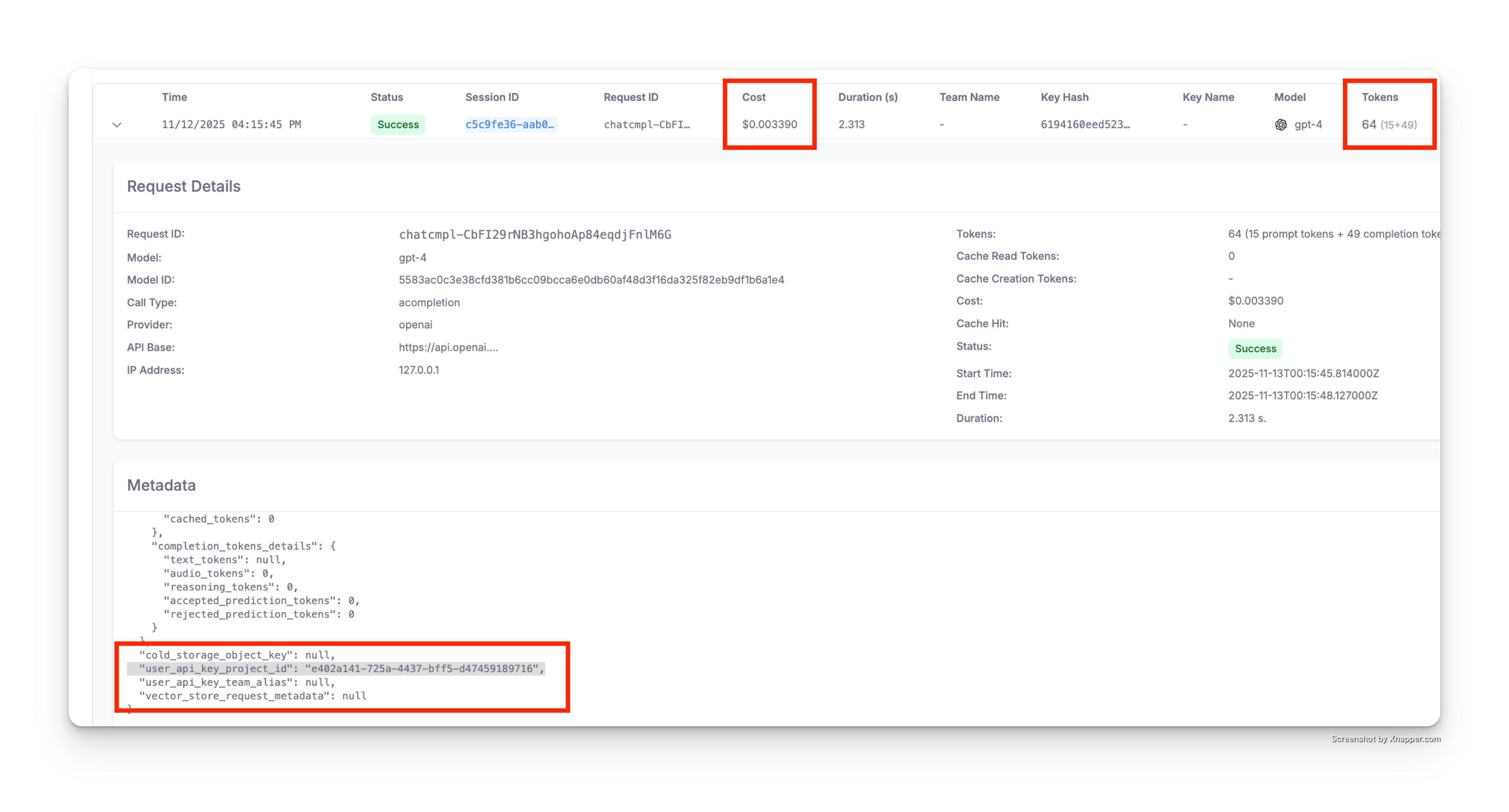
As shown above, the spend logs metadata includes:
"user_api_key_project_id": "e402a141-725a-4437-bff5-d47459189716"- Links the request to your project- All costs and token usage are automatically attributed to the project
- You can query and filter logs by project ID for detailed reporting
API Endpoints
POST /project/new
Create a new project.
Who can call: Admins or Team Admins
Parameters:
project_alias(string, optional): Human-readable name for the projectteam_id(string, required): The team this project belongs tomodels(array, optional): List of models the project can accessmax_budget(float, optional): Maximum spend budget for the projecttpm_limit(int, optional): Tokens per minute limitrpm_limit(int, optional): Requests per minute limitbudget_duration(string, optional): Budget reset period (e.g., "30d", "1mo")metadata(object, optional): Custom metadata for the projectblocked(boolean, optional): Block all API calls for this project
Example:
curl --location 'http://0.0.0.0:4000/project/new' \
--header "Authorization: Bearer $LITELLM_API_KEY" \
--header 'Content-Type: application/json' \
--data '{
    "project_alias": "hotel-recommendations",
    "team_id": "team-123",
    "models": ["claude-sonnet-5"],
    "max_budget": 200,
    "tpm_limit": 100000,
    "metadata": {
        "use_case_id": "SNOW-12346",
        "cost_center": "travel-products"
    }
}'
Response:
{
    "project_id": "project-def",
    "project_alias": "hotel-recommendations",
    "team_id": "team-123",
    "models": ["claude-sonnet-5"],
    "spend": 0.0,
    "budget_id": "budget-xyz",
    "metadata": {
        "use_case_id": "SNOW-12346",
        "cost_center": "travel-products"
    },
    "created_at": "2025-01-15T10:00:00Z",
    "updated_at": "2025-01-15T10:00:00Z"
}
POST /project/update
Update an existing project.
Who can call: Admins or Team Admins
Parameters:
project_id(string, required): The project to updateproject_alias(string, optional): Updated project nameteam_id(string, optional): Move project to different teammodels(array, optional): Updated list of allowed modelsmax_budget(float, optional): Updated budgettpm_limit(int, optional): Updated TPM limitrpm_limit(int, optional): Updated RPM limitmetadata(object, optional): Replaces the project's stored metadata, see belowblocked(boolean, optional): Updated blocked status
Example:
curl --location 'http://0.0.0.0:4000/project/update' \
--header "Authorization: Bearer $LITELLM_API_KEY" \
--header 'Content-Type: application/json' \
--data '{
    "project_id": "project-abc",
    "max_budget": 200,
    "tpm_limit": 200000,
    "metadata": {
        "status": "production"
    }
}'
POST /project/update replaces the project's whole stored metadata instead of merging into it. The project stores tags, guardrails, policies, model_rpm_limit, and model_tpm_limit in metadata too, so an update that sends any of them or metadata keeps only what that request carries. So the example above also removes the project's tags and per-model limits. Send every key you want to keep each time you update one of those fields.
GET /project/info
Get information about a specific project.
Parameters:
project_id(string, required): Query parameter
Example:
curl --location 'http://0.0.0.0:4000/project/info?project_id=project-abc' \
--header "Authorization: Bearer $LITELLM_API_KEY"
Response:
{
    "project_id": "project-abc",
    "project_alias": "flight-search-assistant",
    "team_id": "team-123",
    "models": ["gpt-6.1-sol", "gpt-6-luna"],
    "spend": 45.67,
    "model_spend": {
        "gpt-6.1-sol": 42.30,
        "gpt-6-luna": 3.37
    },
    "litellm_budget_table": {
        "budget_id": "budget-xyz",
        "max_budget": 100.0,
        "tpm_limit": 100000,
        "rpm_limit": 100
    },
    "metadata": {
        "use_case_id": "SNOW-12345"
    }
}
GET /project/list
List all projects the user has access to.
Example:
curl --location 'http://0.0.0.0:4000/project/list' \
--header "Authorization: Bearer $LITELLM_API_KEY"
Response:
[
    {
        "project_id": "project-abc",
        "project_alias": "flight-search-assistant",
        "team_id": "team-123",
        "spend": 45.67
    },
    {
        "project_id": "project-def",
        "project_alias": "hotel-recommendations",
        "team_id": "team-123",
        "spend": 23.45
    }
]
DELETE /project/delete
Delete one or more projects.
Who can call: Admins only
Parameters:
project_ids(array, required): List of project IDs to delete
Example:
curl --location --request DELETE 'http://0.0.0.0:4000/project/delete' \
--header "Authorization: Bearer $LITELLM_API_KEY" \
--header 'Content-Type: application/json' \
--data '{
    "project_ids": ["project-abc", "project-def"]
}'
Note: Projects with associated API keys cannot be deleted. Delete or reassign the keys first.
Model-Specific Quotas
You can set different quotas for different models within a project:
curl --location 'http://0.0.0.0:4000/project/new' \
--header "Authorization: Bearer $LITELLM_API_KEY" \
--header 'Content-Type: application/json' \
--data '{
    "project_alias": "multi-model-project",
    "team_id": "team-123",
    "models": ["gpt-6.1-sol", "gpt-6-luna", "claude-sonnet-5"],
    "max_budget": 500,
    "metadata": {
        "model_tpm_limit": {
            "gpt-6.1-sol": 50000,
            "gpt-6-luna": 200000,
            "claude-sonnet-5": 100000
        },
        "model_rpm_limit": {
            "gpt-6.1-sol": 50,
            "gpt-6-luna": 500,
            "claude-sonnet-5": 100
        }
    }
}'
Require quotas on project models
Quotas are optional by default, so a project can be created with some models limited and others unbounded. Set enforce_project_model_quota in general_settings to require them Since v1.100.0.
general_settings:
  enforce_project_model_quota: true
With true, POST /project/new and POST /project/update answer 400 unless every model on the project has a positive model_rpm_limit and model_tpm_limit, and the error names each model that is missing a limit. Projects that list all-proxy-models, a wildcard such as azure/*, or a model access group are rejected while the setting is on, because those expand to several models at request time and the rate limiter looks quotas up by the exact model name. This applies to the mapping form below too, even when the mapping exempts that provider. List the concrete model names instead.
The check covers the models a project lists, so a project with an empty models list passes it. That project is not limited to any models either, so its keys can call every model the key and its team allow, with no project quota on any of them. Give each project a models list when every project has to be capped.
An update is checked against the project as it will look after the change. A request that leaves out models keeps the stored list, but the limits are stored in the project's metadata, and an update that sends any field stored there replaces them, as POST /project/update describes. So that update is checked only against the limits it sends, and it answers 400 unless it repeats every limit the project's models need, even when it only changes the tags. An update that sends no field stored in metadata, such as one that only changes the description, is checked against the stored limits. So once the setting is on, every update to a project that is missing a limit answers 400, even one that only sets blocked, until an update sets that limit or removes that model from models.
Per-provider and per-model requirements
Since v1.109.0Some models do not need an rpm or tpm limit, such as a video generation model or a pass-through name. Instead of true, give the setting a mapping that says which limits each provider and model needs:
general_settings:
  enforce_project_model_quota:
    default: [rpm, tpm]
    providers:
      vertex_ai: [rpm, tpm]
      runwayml: []
    models:
      "veo-*": [rpm]
      my-passthrough-model: []
Each entry lists the limits it requires: [rpm, tpm], [rpm], [tpm], or []. An entry replaces the whole requirement, so [] exempts that provider or model and [rpm] drops the tpm requirement. default applies wherever no other entry decides, and it is [rpm, tpm] when left out, so a mapping that only lists exemptions still requires both limits on every other model. With the config above, a project can list a Runway model and my-passthrough-model with no limits, a model whose name starts with veo- with only model_rpm_limit, and a Gemini model on Vertex AI with both.
A proxy older than 1.109.0 reads any mapping as true, so it requires both limits on every model and ignores the exemptions. Upgrade the proxy before you replace true with a mapping.
For each model on the project, the first of these that applies decides:
- The entry under
modelswith the model's exact name. - The most specific
*pattern undermodelsthat matches the start of the name, ranked the same way the router ranks its wildcard routes. A pattern does not have to reach the end of the name, so"*-mini"also matchesgpt-5.4-mini-high. - The entries under
providersfor the providers of the deployments the name routes to, aliases, routing groups, and the wildcard route a request would use included. A name served by more than one provider needs every limit any of them requires. default, which also covers a name that no deployment serves.
A provider is the deployment's LiteLLM provider id. That is the custom_llm_provider it sets, else the prefix of its litellm_params.model (vertex_ai in vertex_ai/gemini-3.8-flash), else the provider behind a known OpenAI-compatible api_base (deepseek for deepseek-v4-flash with https://api.deepseek.com/v1), else the provider LiteLLM infers from the model name (vertex_ai for a bare gemini-3.8-flash). A name a team model serves is matched against models entries by the model each team deployment calls, its litellm_params.model without the provider prefix, rather than by the public name its team admin picked, so naming a team model after an exempt entry does not exempt it. The team admin picks the called model too, so an exempt entry under models also exempts a team model that calls a model of that name, whatever its provider. A limit that is set still has to be positive, even on an exempt model, so a 0 or negative value answers 400 as before.
While a policy exempts any provider or model, a team model add, update, or delete re-checks the team's projects that list a name the change serves. It answers 400 naming those projects when the change makes that name need a limit they do not set, such as moving it from an exempt provider to one that needs limits, so set the limits on the projects first and then change the model. A delete that leaves no deployment serving the name is not re-checked, since nothing can call that name anymore. The name then falls to its models entry or default, so when those require a limit, each project that lists the name answers 400 on its next update until it removes the name or sets that limit. Only team model writes re-check projects. A shared model added or changed through the API or config.yaml, or an edit to the policy, can leave a project short of a limit without an error, and that project's next update then answers 400 until it sets the limit.
Every value the boolean setting accepted keeps its meaning. Anything falsy is off, and any other value requires both limits on every model. That includes the strings "true" and "false" and a mapping such as {enabled: false}, so turn the check off with false or by removing the key. Only a mapping that names default, providers, or models is read as a policy. A policy with an unknown key next to those three, a limit other than rpm or tpm, or a provider id LiteLLM does not know makes project create and update, and every team model add, update, and delete, answer 500 with an error naming general_settings.enforce_project_model_quota, instead of turning the check off. Model names under models are not checked against the model list, since an entry may name a model before anyone adds it, so a misspelled name is ignored and that model falls back to its providers.

